How to Get Lyrics on Your Dynamic Island (iPhone Guide)
Want to see lyrics on your iPhone's Dynamic Island while using other apps? Here's how to set up Lyrical to display real-time synced lyrics on the Dynamic Island, Lock Screen, and StandBy Mode.
How to Get Lyrics on Your Dynamic Island (iPhone Guide)
You can display lyrics on your iPhone's Dynamic Island using Lyrical, a lyrics app that shows real-time synced lyrics in the Dynamic Island, Lock Screen Live Activities, and StandBy Mode. The app works with Apple Music and Spotify to keep lyrics visible while you use other apps, check messages, or navigate with Maps.
Experience this with real-time synced lyrics
Lyrical shows every word as it plays, in Korean, romanized, and in sync with the music.
That is the short answer. But if you just got an iPhone 14 Pro, 15, or 16 and you are wondering what this Dynamic Island thing actually does, you are not alone. Most people use it for timers and music controls. Few realize it can display lyrics while you do other things.
This guide shows you how to set up Lyrical to show lyrics on your Dynamic Island, why it is useful, and what to do if it is not working.
What Most People Get Wrong About the Dynamic Island
The biggest mistake is thinking the Dynamic Island is just a fancy notch. It is not. It is a persistent display area that shows live activities — things happening right now that you might want to check without opening an app.
Another mistake is assuming only Apple apps can use it. Third-party apps like Lyrical can display information there too. You are not limited to what Apple gives you.
The third mistake is not realizing the Dynamic Island splits into two parts. The main island shows the primary activity. A tap expands it to show more detail. A long press opens the full app. Learning these gestures makes the Dynamic Island actually useful.
What Is the Dynamic Island (And Why Lyrics Make Sense There)
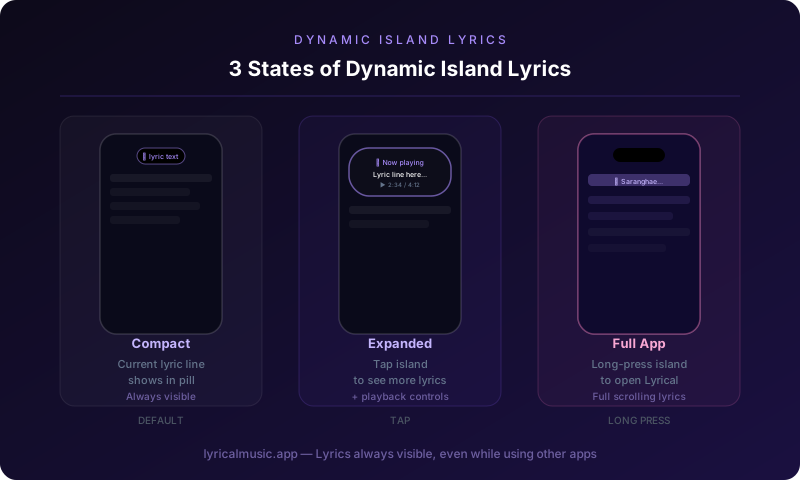
The Dynamic Island is the pill-shaped cutout at the top of newer iPhones. It replaces the notch and does way more than hold the front camera.
Think of it as a dashboard for live activities. When you have a timer running, it shows the countdown. When you are navigating with Maps, it shows the next turn. When you are playing music, it shows the track and playback controls.
Here is the counterintuitive thing: the Dynamic Island is perfect for lyrics because you do not need to stay in the music app to see them. You can be texting a friend, scrolling Instagram, or checking email, and the current lyric line stays visible at the top of your screen.
The emotional journey of using Dynamic Island lyrics: at first you keep opening the music app out of habit. Then you realize you do not have to. The lyrics are just there, always visible, never in the way. It feels like the phone finally understands what you actually want.
How to Set Up Lyrical for Dynamic Island
Step 1: Download Lyrical
Get Lyrical from the App Store. It is free to download with premium features available.
Step 2: Connect your music app
Open Lyrical and grant permission to access your music. The app works with Apple Music and Spotify. Choose your primary service during setup.
Step 3: Enable Dynamic Island
Go to Settings > Live Activities in Lyrical. Toggle on "Show on Dynamic Island." This allows lyrics to appear there while music plays.
Step 4: Start playing music
Open Apple Music or Spotify. Play a song. Lyrical automatically detects it and loads lyrics.
Step 5: Check your Dynamic Island
Look at the top of your screen. You should see the song title and current lyric line in the Dynamic Island. Tap it to expand and see more lyrics. Long press to open the full Lyrical app.
Step 6: Use other apps
Switch to any other app. Messages, Instagram, Safari — whatever. The Dynamic Island stays visible with your lyrics. Sing along while you do other things.
Using Dynamic Island Lyrics Effectively
The tap gesture: A quick tap on the Dynamic Island expands it to show a larger lyrics view. This is useful when you want to see more context without leaving your current app.
The long press: Press and hold the Dynamic Island to open the full Lyrical app. Use this when you want to browse lyrics, adjust settings, or pick a different song.
The swipe: You can swipe between multiple live activities if you have more than one running. A timer and lyrics can coexist. Swipe to switch which one takes priority.
The dismiss: Swipe up on the Dynamic Island to temporarily hide it. Lyrics will pause but resume when you play music again.
Dynamic Island vs Lock Screen vs StandBy Mode
Lyrical supports three ways to see lyrics without opening the full app:
Dynamic Island: Always visible while using other apps. Best for multitasking.
Lock Screen Live Activities: Shows lyrics on your lock screen when your phone is locked. Best for glancing at lyrics without unlocking.
StandBy Mode: Displays lyrics full-screen when your phone is charging horizontally. Best for desk or nightstand use.
You can enable all three and use whichever fits your situation. Charging at your desk? StandBy Mode. Walking and want to check lyrics quickly? Lock Screen. Texting a friend while singing? Dynamic Island.
Troubleshooting Dynamic Island Lyrics
Problem: Lyrics are not showing on the Dynamic Island
Solution: Check that Live Activities are enabled in Lyrical settings. Also check iPhone Settings > Face ID & Passcode > Live Activities is turned on.
Problem: Dynamic Island shows music controls but not lyrics
Solution: Make sure you are using Lyrical, not the default Apple Music or Spotify Live Activity. The system music controls do not show lyrics. You need Lyrical's Live Activity specifically.
Problem: Lyrics lag behind the music
Solution: This is usually a network issue. Lyrical needs to download lyrics data. Try downloading lyrics for offline use in the app settings.
Problem: Dynamic Island disappears when I open certain apps
Solution: Some full-screen apps (mostly games) hide the Dynamic Island. This is normal. Lyrics will return when you exit the full-screen app.
Problem: The text is too small to read
Solution: Tap the Dynamic Island to expand it. The expanded view shows larger text with more context.
What Lyrical Does Differently
Most lyrics apps do not support the Dynamic Island at all. They require you to stay in the app to see lyrics. Lyrical was built for the Dynamic Island from the start.
Real-time sync: Lyrics update on the Dynamic Island as the song plays. No delay. No manual scrolling.
Romanization support: Korean, Japanese, and Chinese lyrics show with phonetic spelling on the Dynamic Island, not just original characters.
Minimal design: The Dynamic Island view shows exactly what you need — current line, next line, and song info. Nothing cluttered. Nothing distracting.
The specific thing Lyrical does that nothing else does: it makes the Dynamic Island feel like it was designed for lyrics. The integration is seamless. You forget it is a third-party app. It just feels like your iPhone got better at music.
Common Questions About Dynamic Island Lyrics
Which iPhones support Dynamic Island lyrics?
iPhone 14 Pro, iPhone 14 Pro Max, iPhone 15, iPhone 15 Plus, iPhone 15 Pro, iPhone 15 Pro Max, iPhone 16, iPhone 16 Plus, iPhone 16 Pro, and iPhone 16 Pro Max. Older iPhones with notches cannot use Dynamic Island features.
Does this work with both Apple Music and Spotify?
Yes. Lyrical detects music playing from either app and displays lyrics accordingly. You can switch between services without changing settings.
Do I need to keep Lyrical open in the background?
Lyrical needs to run in the background to update lyrics. iOS manages this automatically. You do not need to manually keep it open.
Does Dynamic Island lyrics drain battery?
Live Activities use minimal battery. The impact is similar to having a timer running. You will not notice a significant difference in daily battery life.
Can I use Dynamic Island lyrics while driving?
Technically yes, but please do not. Distracted driving is dangerous. Use CarPlay instead — Lyrical supports lyrics on CarPlay displays for safe viewing by passengers.
Why do some songs not show lyrics?
Lyrical pulls from community lyric databases. Popular songs usually have lyrics available quickly. Niche or very new songs might take time to be added. You can request lyrics through the app.
Can I customize what shows on the Dynamic Island?
Lyrical offers some customization — you can choose to show romanization or original characters, adjust text size, and enable or disable certain features. Full customization is in the app settings.
What happens if I get a phone call?
The Dynamic Island shows the call interface while the call is active. Lyrics resume when the call ends. Your music pauses during calls by default.
The Bottom Line
The Dynamic Island is more than a notch replacement. It is a persistent display for live information. Lyrics belong there because you want to see them without stopping what you are doing.
Lyrical makes it work. Real-time synced lyrics, romanization support, and seamless iOS integration. The 3am spiral of switching between apps to check lyrics? Gone. The lyrics are just there, always visible, always in sync.
Try Lyrical Free
Lyrical shows real-time synced lyrics on your Dynamic Island, Lock Screen, and StandBy Mode. Works with Apple Music and Spotify. Korean, Japanese, and Chinese romanization included.
Download Lyrical and see your Dynamic Island do something actually useful.
*Last updated: March 2026*