CarPlay Karaoke: How to See Lyrics in Your Car
Want to see lyrics on your car's display while driving? Here's how to use Lyrical with CarPlay to display synced lyrics, romanization, and sing along safely using your car's built-in screen.
CarPlay Karaoke: How to See Lyrics in Your Car
You can display lyrics on your car's screen using Lyrical with Apple CarPlay. The app shows real-time synced lyrics with romanization on your car's built-in display, allowing passengers to sing along while you drive. It works with Apple Music and Spotify, supporting both wired and wireless CarPlay connections.
Experience this with real-time synced lyrics
Lyrical shows every word as it plays, in Korean, romanized, and in sync with the music.
That is the short answer. But if you have ever been on a road trip with friends, music blasting, everyone trying to sing along but nobody knowing the words, you know the actual problem. Someone is holding a phone, squinting at lyrics, probably getting carsick. There is a better way.
This guide shows you how to set up Lyrical for CarPlay, what you can and cannot do, and how to turn your car into a karaoke machine (for passengers, obviously).
What Most People Get Wrong About CarPlay Lyrics
The biggest mistake is thinking CarPlay only shows navigation and basic music controls. It can do more. Third-party apps like Lyrical can display information on your car's screen, including lyrics.
Another mistake is assuming you need a new car or expensive aftermarket stereo. If your car supports CarPlay, Lyrical works with it. It does not matter if you have a BMW or a Honda. CarPlay is CarPlay.
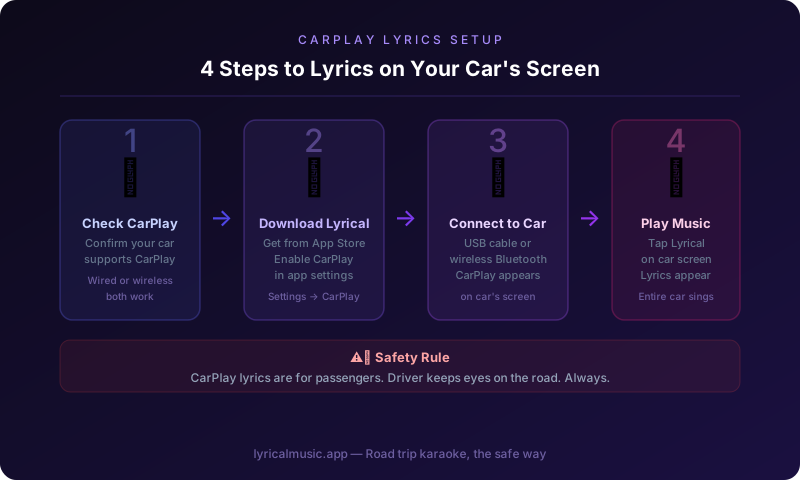
The third mistake is trying to use lyrics while driving solo. Do not do that. CarPlay lyrics are for passengers. The driver keeps eyes on the road. This is not a suggestion. It is a rule.
What Is CarPlay (And Why Lyrics Work There)
CarPlay is Apple's system for connecting your iPhone to your car. It puts a simplified iPhone interface on your car's built-in display. You get Maps, Messages, Music, and supported third-party apps in a driver-friendly format.
Here is the counterintuitive thing: CarPlay is actually safer than using your phone directly because the interface is designed for minimal distraction. Large buttons. Simple layouts. Voice control via Siri.
For lyrics, CarPlay makes sense because the screen is larger than your phone, positioned where passengers can see it easily, and integrated with your car's audio system. Everyone in the car can see the lyrics, not just the person holding the phone.
The emotional journey of CarPlay karaoke: you plug in your phone, skeptical that this will work. You start a song. Lyrics appear on the dashboard screen. Your friend in the passenger seat starts singing along, word for word. The whole car joins in. You realize road trips just got better.
How to Set Up Lyrical for CarPlay
Step 1: Check your CarPlay connection
Make sure your iPhone connects to your car. This can be wired (USB cable) or wireless (Bluetooth/WiFi). Check your car's manual if you are not sure how to connect.
Step 2: Download Lyrical
Get Lyrical from the App Store. Enable CarPlay support in the app settings.
Step 3: Connect to your car
Plug in your USB cable or connect wirelessly. Your car's display should show the CarPlay interface.
Step 4: Open Lyrical in CarPlay
On your car's screen, find the Lyrical app icon. Tap it. The app launches in CarPlay mode.
Step 5: Play music
Use your car's audio controls or the CarPlay Music app to start playing a song from Apple Music or Spotify. Lyrical detects the music and displays lyrics on the CarPlay screen.
Step 6: Sing along
Passengers read lyrics from the dashboard display. The driver focuses on driving. Everyone wins.
What You See on the CarPlay Screen
Current lyric line: Large, readable text showing the line being sung right now.
Next lyric line: Smaller text previewing what comes next, so passengers can prepare.
Romanization: For Korean, Japanese, and Chinese songs, phonetic spelling appears below the original text.
Progress bar: Shows where you are in the song.
Basic controls: Play, pause, skip — though most people use steering wheel controls or voice commands.
The design is intentionally simple. CarPlay screens vary in size and resolution across car models. Lyrical's CarPlay interface works on all of them, from small displays in compact cars to large screens in luxury vehicles.
Wired vs Wireless CarPlay
Wired CarPlay: Connect with a USB cable. Pros: reliable connection, charges your phone, works in older cars. Cons: cable clutter, phone is tethered.
Wireless CarPlay: Connects automatically when you start the car. Pros: no cables, phone stays in your pocket. Cons: can be less reliable, drains phone battery faster.
Lyrical works with both. Wireless is more convenient for lyrics because passengers can pass the phone around to queue songs without unplugging anything.
CarPlay Limitations You Should Know
Driver distraction: CarPlay is designed to minimize driver distraction. Some features available on your phone are not available on CarPlay. This is intentional and good.
Touch restrictions: Some cars disable touchscreens while driving. Use voice commands or steering wheel controls instead.
Audio focus: CarPlay audio goes through your car's speakers. Make sure your car's audio system is set to CarPlay, not radio or Bluetooth audio.
App limits: Not all iPhone apps work with CarPlay. Only apps specifically designed for CarPlay appear on the car's screen. Lyrical is one of them.
Troubleshooting CarPlay Lyrics
Problem: Lyrical does not appear on the CarPlay screen
Solution: Make sure CarPlay is enabled in Lyrical settings. Some cars require you to enable third-party apps in the car's own settings menu.
Problem: Lyrics show on phone but not on CarPlay
Solution: Check that you opened Lyrical through the CarPlay interface, not on your phone. The CarPlay app and phone app are separate views.
Problem: Lyrics lag behind the music
Solution: This is usually a network issue. Lyrical needs to download lyrics data. Try downloading lyrics for offline use before your trip.
Problem: CarPlay disconnects randomly
Solution: For wireless CarPlay, check that Bluetooth and WiFi are enabled on your phone. For wired, try a different USB cable. Some cables only charge and do not transmit data.
Problem: Text is too small to read from the back seat
Solution: Unfortunately, text size is limited by CarPlay design guidelines. Larger lyrics work better on bigger screens. Consider passing the phone to back seat passengers if they cannot see the dashboard display.
What Lyrical Does Differently
Most lyrics apps do not support CarPlay at all. They require you to look at your phone. Lyrical is built for CarPlay from the ground up.
Real-time sync: Lyrics update on your car's display as the song plays. No manual scrolling. No lag.
Romanization on the big screen: Korean, Japanese, and Chinese lyrics show with phonetic spelling, making it easier for everyone in the car to sing along.
Passenger-friendly design: Large text, simple layout, minimal distractions. The person riding shotgun becomes the karaoke leader.
The specific thing Lyrical does that nothing else does: it turns your car's dashboard into a karaoke display. Not a phone propped up on the dashboard. Not someone reading from a screen and getting carsick. An actual integrated experience where the lyrics belong — on the car's built-in display.
Common Questions About CarPlay Lyrics
Does this work with Android Auto?
No. Lyrical is iOS only. Android users need different solutions. The CarPlay features described here are Apple-specific.
Do I need a special cable for CarPlay?
For wired CarPlay, you need a Lightning to USB cable (or USB-C for newer iPhones). The cable that came with your iPhone works. Some third-party cables only charge and do not support data — avoid those.
Can the driver see lyrics safely?
No. Drivers should not read lyrics while driving. CarPlay lyrics are for passengers only. The driver keeps eyes on the road. This is safety-critical.
Does CarPlay lyrics work with any car?
Any car with Apple CarPlay support works. Most cars from 2016 onward have CarPlay. Check your car's manual or look for the CarPlay logo on the USB ports.
Can I control lyrics with steering wheel buttons?
Steering wheel controls usually handle play, pause, and skip. They do not control lyrics directly. Passengers can use the CarPlay touchscreen to interact with lyrics.
What if my car does not have CarPlay?
You have a few options: aftermarket CarPlay stereos start around $300. Or use a phone mount and Lyrical's regular app. CarPlay is better, but the app works without it.
Do lyrics work with wireless CarPlay?
Yes. Wireless CarPlay works exactly like wired, just without the cable. Lyrics display the same way.
Can I use this for long road trips?
Absolutely. Download lyrics for offline use before you leave. Then lyrics work even in areas with no cell service. Perfect for cross-country drives.
The Bottom Line
CarPlay lyrics turn your car into a karaoke machine. Passengers see synced lyrics on the dashboard display. Everyone sings along. The driver stays focused on driving.
Lyrical makes it work. Real-time sync, romanization support, and seamless CarPlay integration. The road trip where everyone mumbles through the chorus because nobody knows the words? Over. Now everyone knows the words.
Try Lyrical Free
Lyrical shows real-time synced lyrics on CarPlay displays. Works with Apple Music and Spotify. Supports Korean, Japanese, and Chinese romanization. Wired and wireless CarPlay compatible.
Download Lyrical and turn your car into a karaoke machine with CarPlay.
*Last updated: March 2026*