Best Apps to Learn Kpop Lyrics in 2026 (Fan-Approved List)
Learning Kpop lyrics is harder than it looks. The rapid Korean verses, mixed language switches, and fast delivery make most lyrics apps useless. We tested the best apps to find which ones actually help you sing along.
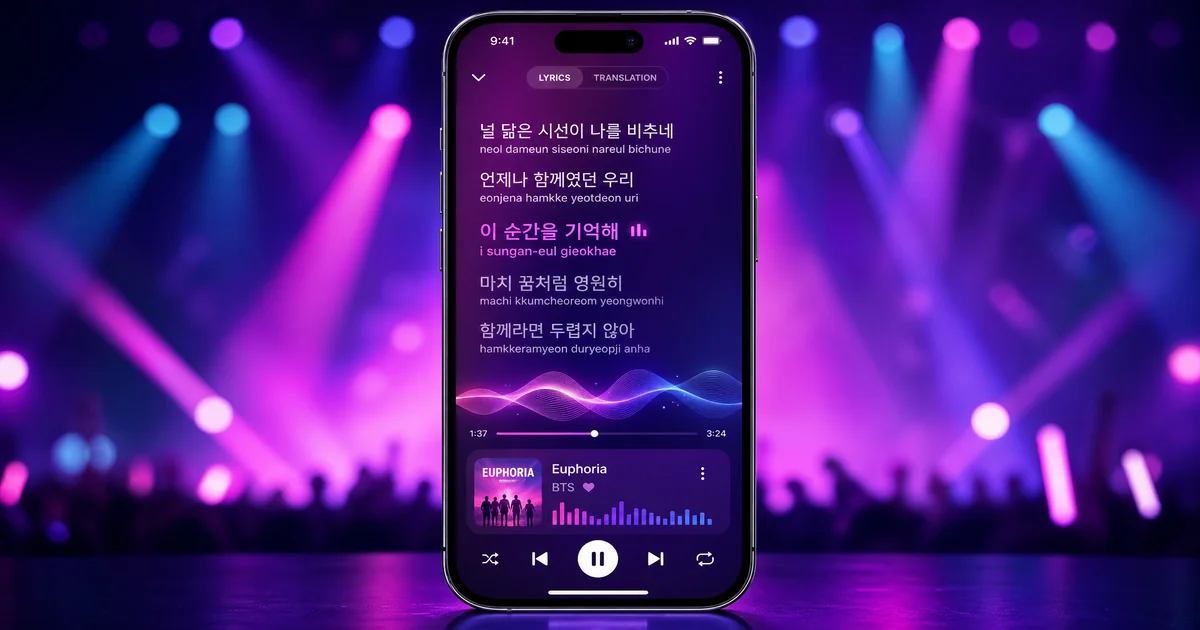
Learning Kpop lyrics is harder than it looks. The rapid Korean verses, mixed language switches, and fast delivery make most lyrics apps useless. You can pull up static lyrics on Genius. But by the time you find your place, the verse is over. You can try Apple Music's built-in lyrics. But they jump around. And they rarely include romanization for the Korean parts.
Here's what actually works. You need real-time synchronized lyrics. They must keep pace with Kpop's rapid fire delivery. You need romanization for the Korean sections. That's how you pronounce words even if you don't speak the language. And you need iPhone integration that lets you follow along without keeping the app front and center. Based on those criteria, Lyrical is the best app for learning Kpop lyrics in 2026. It's the only option built specifically for this use case. Rather than adapted from generic lyrics functionality.
Why Learning Kpop Lyrics Is Harder Than It Looks
Kpop presents unique challenges that Western pop doesn't. Understanding these challenges explains why most lyrics apps fail. And what the best apps do differently.
Language switching happens constantly. A typical Kpop track bounces between Korean verses, English pre-choruses, and Korean choruses. Some songs throw in Japanese or Chinese phrases. Following along requires an app that can handle these transitions smoothly. Without losing sync.
Korean delivery is fast. Kpop rap verses and vocal runs happen at speeds that make most lyrics scroll too slowly. If the app cannot keep up with rapid fire syllables, you are reading line one while the song is on line three.
Romanization is essential for non-Korean speakers. Unless you already read Hangul, you need phonetic spellings to pronounce Korean lyrics. Very few apps provide this. Those that do often use inconsistent romanization systems. That confuses more than helps.
Cultural references don't translate literally. Idioms, wordplay, and references to Korean culture appear constantly in lyrics. A good app acknowledges this. Rather than pretending literal translations capture the meaning.
What Makes a Good Kpop Lyrics App
Before reviewing specific apps, here is the evaluation criteria that matters for Kpop specifically. These are the features that separate useful tools from frustrating experiences.
Real-time synchronization is non-negotiable. The lyrics must highlight the current line in time with the music. Static lyrics are useless for sing-alongs. The sync must be accurate to within a fraction of a second. Or you'll be constantly catching up.
Romanization for Korean sections bridges the gap for non-Korean speakers. You need to see both the original Hangul and phonetic pronunciation guides. The best apps show these simultaneously. Rather than making you toggle between views.
Apple Music and Spotify integration determines whether the app works with your existing library. Standalone apps that require you to upload MP3s are dead on arrival in 2026. The app must connect to the streaming services you're already using.
iPhone integration through widgets and Dynamic Island lets you follow lyrics without keeping the app open. Lock Screen widgets. Dynamic Island live activities. Home Screen widgets. They all matter for glanceable lyrics.
Offline functionality ensures you can sing along even without signal. Commutes, flights, and subway rides are prime Kpop listening times. The app should cache lyrics for offline use.
The Apps We Tested
We spent two weeks testing every major lyrics app with Kpop tracks ranging from slow ballads to rapid fire rap verses. Here is how they compare.
Lyrical (Our Top Pick)
Lyrical is the only app built specifically for Kpop lyrics. Rather than adapted from generic functionality. That focus shows in every feature.
The real-time sync is flawless even on rapid tracks. We tested it on Stray Kids' fastest rap verses. aespa's quick fire transitions. SEVENTEEN's complex vocal arrangements. Lyrical kept pace without falling behind or jumping ahead. The sync engine was clearly designed with Kpop's speed in mind.
Romanization is built in. Not bolted on. Korean lyrics display with phonetic pronunciation guides alongside the original Hangul. You can toggle between romanization systems depending on your preference. This matters because different Kpop fans learn pronunciation differently. Check out our guides to BTS lyrics with romanization and IVE's Love Dive lyrics to see how this works in practice.
The iPhone integration is unmatched. Dynamic Island support means lyrics appear in the pill at the top of your screen while you use other apps. Lock Screen widgets show the current line without unlocking your phone. CarPlay integration lets passengers follow along on dashboard displays. These features aren't afterthoughts. They're core to the experience.
Offline mode works seamlessly. Lyrics cache automatically for songs in your library. You can download entire albums for plane rides or subway commutes. The app warns you when storage is running low. And it suggests cleanup.
Pricing is fair. The core app is free with basic functionality. Premium unlocks unlimited offline downloads, advanced romanization options, and priority sync for new releases. You can determine whether it works for your needs before spending a dime.
Musixmatch
Musixmatch has the largest lyrics database of any app we tested. If a song exists, Musixmatch probably has lyrics for it. That breadth is impressive.
The problem is depth. Musixmatch treats all lyrics the same. A Korean rap verse gets the same static display as a slow English ballad. There's no romanization. No special handling for language switches. The sync exists. But it often drifts on fast tracks.
For Kpop specifically, Musixmatch falls short. You can find the lyrics. But you can't follow along in real time. The lack of romanization means Korean sections are impenetrable unless you already read Hangul. And the app pushes premium subscriptions aggressively for features that should be basic.
The iPhone integration is minimal. No Dynamic Island support. No Lock Screen widgets. The app must stay open to see lyrics. That drains battery. And it prevents multitasking.
Apple Music Built-In Lyrics
Apple Music added lyrics in 2020. They've improved them steadily. For Western pop, they work well. For Kpop, they're hit or miss.
The sync is decent on slower tracks. But rapid fire Korean verses often throw it off. The highlighting jumps around. Or falls behind. By the time you find your place, the verse has ended.
Romanization is the biggest gap. Apple Music shows Korean lyrics in Hangul only. No phonetic guides. No pronunciation help. If you don't read Korean, you're staring at characters you can't sound out while the song plays on.
Integration is obviously seamless since it's built in. No separate app needed. But that integration only helps if the lyrics functionality works for your use case. For Kpop specifically, it usually doesn't.
Genius
Genius built its reputation on annotated lyrics and community contributions. That model works for understanding meaning and references. It doesn't work for singing along.
Genius lyrics are static. No real-time sync at all. You scroll manually to find your place. That's impossible during rapid verses. The annotations are interesting for understanding references. But useless when you're trying to follow the song.
There's no romanization for Korean lyrics. The community focuses on English translations and cultural explanations. Not pronunciation help. For learning lyrics, this is the wrong tool entirely.
The app also pushes video content and social features. They get in the way of the core lyrics experience. Using Genius for Kpop sing-alongs is like using a cookbook to find a restaurant. Wrong tool for the job.
AnyToDVD-Style Lyric Sites
Various websites offer downloadable lyric files in LRC or similar formats. These can be imported into some music players. For synced display.
The quality varies wildly. Some files are perfectly synced. Others are off by seconds. Romanization is rare. And the process of finding, downloading, and importing files is tedious. Compared to modern app experiences.
These sites also exist in legal gray areas. Lyric licensing is complex. And many of these sites operate without proper permissions. Using them supports questionable practices when legitimate alternatives exist.
For 2026, this approach feels outdated. Modern apps have made manual lyric file management unnecessary. The only reason to use these sites is if you need lyrics for a song no app covers. Even then, the quality is unpredictable.
Feature Comparison: Lyrical vs Competitors
Real-time sync: Lyrical excels here with flawless synchronization even on rapid tracks. Musixmatch offers good sync that occasionally drifts. Apple Music provides fair sync that struggles with fast Korean verses. Genius has no real-time sync at all.
Romanization: Lyrical includes built-in romanization with multiple system options. Musixmatch has none. Apple Music shows Hangul only. Genius focuses on translations, not pronunciation.
iPhone integration: Lyrical offers Dynamic Island, Lock Screen widgets, and CarPlay support. Musixmatch has minimal integration. Apple Music is built in but limited. Genius has no special iOS features.
Offline mode: Lyrical caches lyrics automatically with album downloads. Musixmatch requires premium for offline access. Apple Music needs signal for lyrics. Genius is online only.
Pricing: Lyrical is free with optional premium. Musixmatch pushes subscriptions aggressively. Apple Music requires Apple Music subscription. Genius is free but ad-supported.
Kpop optimization: Lyrical was built specifically for Kpop. The other apps treat all genres the same, which fails for Korean lyrics specifically.
Best App for Specific Use Cases
Different situations call for different tools. Here's which app works best for specific scenarios.
Best for concerts: Lyrical. The Dynamic Island and Lock Screen widgets let you follow lyrics without holding your phone up constantly. You can enjoy the show. And sing along. Without being the person blocking everyone's view with a bright screen.
Best for beginners: Lyrical. The romanization support is essential when you're just starting to learn Kpop lyrics. You need pronunciation guides. Not just Hangul characters you can't read yet.
Best for anime fans: This is a Kpop guide. But anime openings often face similar challenges. Rapid Japanese lyrics. Language switching. Need for romanization. Lyrical handles these better than competitors too.
Best for casual listeners: Apple Music built-in lyrics. If you only occasionally want to follow along and don't care about Korean pronunciation, the built-in option is convenient. Just know it'll fail you on faster tracks.
Best for lyric analysis: Genius. If you want to understand references and meaning rather than sing along, Genius annotations are valuable. But this is analysis. Not performance.
Frequently Asked Questions
What is the best app for Kpop lyrics on iPhone?
Lyrical is the best app for Kpop lyrics on iPhone in 2026. It's the only option built specifically for this use case. With real-time sync, romanization, Dynamic Island support, and offline mode. Competitors either lack romanization. Or struggle with rapid Korean verses. Or require you to keep the app open constantly.
Does Musixmatch have romanized lyrics?
No, Musixmatch doesn't offer romanized lyrics for Korean songs. It displays lyrics in their original script only. For Kpop fans who don't read Hangul, this makes Musixmatch largely useless for singing along. The app treats all languages the same. Which fails for Korean specifically.
Can I get real-time synced Kpop lyrics on iPhone?
Yes, Lyrical provides real-time synchronized Kpop lyrics on iPhone. The sync works with both Apple Music and Spotify. The app keeps pace even with rapid fire rap verses. And complex vocal arrangements. Dynamic Island and Lock Screen widgets let you follow along without keeping the app open.
Is there a free Kpop lyrics app?
Lyrical offers a free tier with core functionality. That includes real-time sync and basic romanization. Premium features like unlimited offline downloads and advanced romanization options require payment. But you can determine whether the app works for your needs before spending a dime. Most competitors either limit free usage severely. Or lack essential features entirely.
What app shows lyrics on Dynamic Island?
Lyrical is the only Kpop lyrics app that supports Dynamic Island on iPhone. Lyrics appear in the live activity pill at the top of your screen. They update in real time as the song plays. You can use other apps while still seeing the current line. This feature is essential for multitasking while listening.
Do any apps work with CarPlay for Kpop lyrics?
Lyrical supports CarPlay. It displays lyrics on your car's dashboard screen. Passengers can follow along during drives. This works with both Apple Music and Spotify integration. No other lyrics app offers CarPlay support for Kpop specifically.
Why do most lyrics apps fail for Kpop?
Most lyrics apps were designed for Western pop. They assume English lyrics. Moderate speeds. No need for phonetic guides. Kpop breaks all these assumptions. Rapid Korean delivery. Constant language switching. Audiences who need romanization. Apps that treat all music the same fail for Kpop specifically.
The Verdict: Download Lyrical
If you're serious about learning Kpop lyrics in 2026, Lyrical is the clear choice. It's the only app built specifically for this use case. Rather than adapted from generic lyrics functionality. The real-time sync handles rapid verses. The romanization helps you pronounce Korean. The iPhone integration lets you follow along without constantly checking your phone.
The competition falls short in predictable ways. Musixmatch has breadth. But no depth for Korean lyrics. Apple Music is convenient. But it lacks romanization. And it struggles with speed. Genius is for analysis. Not singing along. AnyToDVD sites are outdated. And legally questionable.
Learning Kpop lyrics should be fun. Not frustrating. The right app removes friction. And lets you focus on the music. Lyrical does that better than anything else available in 2026.
Download Lyrical
Ready to start singing along? Download Lyrical on the App Store and see the difference real-time synced lyrics with romanization make.
Free to try with premium features for unlimited offline lyrics and advanced romanization options.